

The Speaker
- Nils Röhrig, 39
- Software Engineer, Speaker, Trainer, Author
- Frontend focus, full-stack profile
- Svelte user since 2019
- What Svelte Actually Is
- A Brief History
- The Major Changes in Svelte 5
- Runes & Reactivity
- Component Composition
- Asynchronous Data
- Other Useful Features
- Demo App
Agenda
Svelte
/ˈsvɛlt/
thin, slender
=
Svelte
/ˈsvɛlt/
Svelte
/ˈsvɛlt/
thin, slender
=
refined, delicate
Svelte is a UI framework that uses a compiler to let you write breathtakingly concise components that do minimal work in the browser, using languages you already know — HTML, CSS and JavaScript.
- Svelte is a UI component framework.
- Svelte has a compiler.
- Svelte uses languages you already know.
Svelte is a Framework
Logo
Register
Home
E-Mail
Submit
etc. pp...
Component
Component
Component
Svelte is a Framework
Svelte has a Compiler
<h1>Simple Component</h1>Component.svelte
Svelte has a Compiler
<h1>Simple Component</h1>Svelte has a Compiler
import { SvelteComponent, detach, element, init,
         insert, noop, safe_not_equal } from "svelte/internal";

function create_fragment(ctx) {
  let h1;

  return {
    c() {
      h1 = element("h1");
      h1.textContent = "Simple Component";
    },
    m(target, anchor) {
      insert(target, h1, anchor);
    },
    p: noop,
    i: noop,
    o: noop,
    d(detaching) {
      if (detaching) detach(h1);
    },
  };
}

class SimpleComponent extends SvelteComponent {
  constructor(options) {
    super();
    init(this, options, null, create_fragment, safe_not_equal, {});
  }
}

export default SimpleComponent;
Svelte has a Compiler
<h1>Simple Component</h1>import 'svelte/internal/disclose-version';
import 'svelte/internal/flags/legacy';
import 'svelte/internal/flags/async';
import * as $ from 'svelte/internal/client';
var root = $.from_html(`<h1>Simple Component!</h1>`);
export default function App($$anchor) {
var h1 = root();
$.append($$anchor, h1);
}Component.js
Svelte has a Compiler
<h1>Simple Component</h1>import { mount } from 'svelte';
import App from './App.svelte';
const app = mount(App, {
target: document.querySelector('#app'),
props: { some: 'property' }
});main.js
Svelte has a Compiler
Svelte uses known Languages
<!-- DECLARATIVE MARKUP -->
<h1>Hello Workshop People!</h1>
<p>{"Any expression works here!"}</p>
Component.svelte
Svelte uses known Languages
<h1>Simple Component</h1><script>
// STATE & BEHAVIOR
</script>
<!-- DECLARATIVE MARKUP -->
<h1>Hello Live Event People!</h1>
<p>{"Any expression works here!"}</p>
<style>
/* PRESENTATION */
</style>Component.svelte
Svelte uses known Languages
Svelte uses known Languages...
...and extends them

Logic Blocks
Special constructs in template syntax that enable flow control in the markup. Think conditionals & loops.

Directives
A special kind of attribute that defines some specific behavior for elements or components.
Runes
A specific kind of language primitive that enables the reactive capabilities of Svelte apps.

Logic Blocks
&
Directives
<h1>Simple Component</h1><script>
let toggles = $state([false, false, false]);
</script>
<table>
<tbody>
{#each toggles as checked, i}
<tr>
<td><input id="toggle-{i}" type="checkbox"
bind:checked={toggles[i]}
/>
</td>
<td><label for="toggle-{i}">Toggle {i}</label></td>
<td>
{#if checked}
<span style:color="green">active</span>
{:else}
inactive
{/if}
</td>
</tr>
{/each}
</tbody>
</table>A Brief History of Svelte
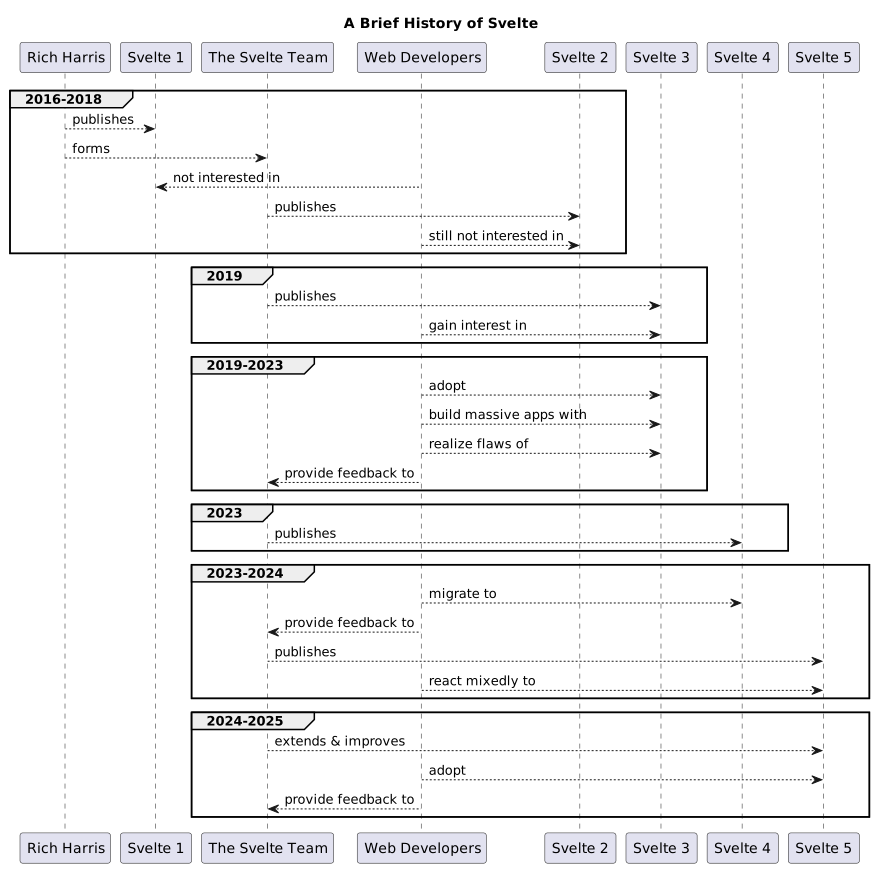
The Major Changes in Svelte 5
The Major Changes in Svelte 5
| Svelte 4 | Svelte 5 | What changes? |
|---|---|---|
Reactive statements ($:) and stores |
Runes ($state, $derived, …) |
Reactivity becomes more consistent: runes unify local and shared state under a single model. |
| Slots | Snippets | Snippets replace slots with a more flexible, typed approach to reusable markup blocks. |
| Event listeners via special syntax | Event listeners as props | Events are no longer handled through dedicated syntax but passed as regular component props. |
| Actions | Attachments | Attachments replace actions and provide a more consistent and modern API for DOM hooks. |
& Directives
Runes & Reactivity
Runes are symbols that you use in
.svelteand.svelte.js / .svelte.tsfiles to control the Svelte compiler. If you think of Svelte as a language, runes are part of the syntax — they are keywords.
- Runes are keywords and part of Svelte syntax
- Specific instructions to Svelte compiler
- Usable in- and outside of Svelte components
Some Important Runes
Some Important Runes

$state
Defines a reactive state value containing arbitrary data – in a component or elsewhere.

$derived
Defines a reactive value that is derived from other reactive values and updated automatically.

Extracts the values of any properties that are provided to the component as attributes.
$props
Defines a side effect that listens to reactive values and executes whenever one of theses values changes.
$effect

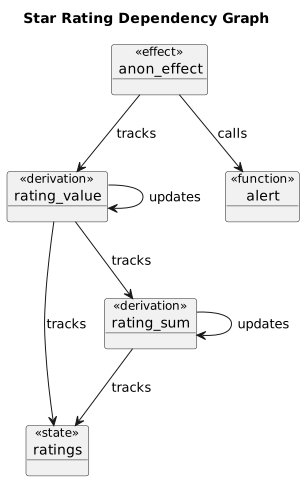
<script>
  import Star from "./Star.svelte";
  let ratings = $state([]);
  let rating_sum = $derived(
    ratings.reduce(
      (sum, rating) => sum + rating, 0
    )
  );
  let rating_value = $derived(
    rating_sum / Math.max(ratings.length, 1)
  );

  $effect(() => {
    if (Math.round(rating_value) === 5) {
	  alert("🎉 Perfect score!");
    }
  });
</script>
<script>
import Star from "./Star.svelte";
let ratings = $state([]);
let rating_sum = $derived(
ratings.reduce(
(sum, rating) => sum + rating, 0
)
);
let rating_value = $derived(
rating_sum / Math.max(ratings.length, 1)
);
$effect(() => {
if (Math.round(rating_value) === 5) {
alert("🎉 Perfect score!");
}
});
</script><script>
import Star from "./Star.svelte";
let ratings = $state([]);
let rating_sum = $derived(
ratings.reduce(
(sum, rating) => sum + rating, 0
)
);
let rating_value = $derived(
rating_sum / Math.max(ratings.length, 1)
);
$effect(() => {
if (Math.round(rating_value) === 5) {
alert("🎉 Perfect score!");
}
});
</script><script>
import Star from "./Star.svelte";
let ratings = $state([]);
let rating_sum = $derived(
ratings.reduce(
(sum, rating) => sum + rating, 0
)
);
let rating_value = $derived(
rating_sum / Math.max(ratings.length, 1)
);
$effect(() => {
if (Math.round(rating_value) === 5) {
alert("🎉 Perfect score!");
}
});
</script><script>
import Star from "./Star.svelte";
let ratings = $state([]);
let rating_sum = $derived(
ratings.reduce(
(sum, rating) => sum + rating, 0
)
);
let rating_value = $derived(
rating_sum / Math.max(ratings.length, 1)
);
$effect(() => {
if (Math.round(rating_value) === 5) {
alert("🎉 Perfect score!");
}
});
</script>Universal Reactivity
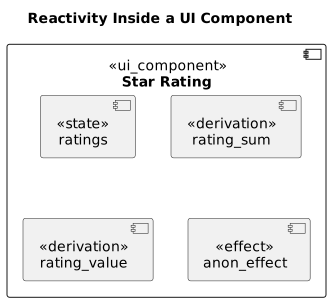
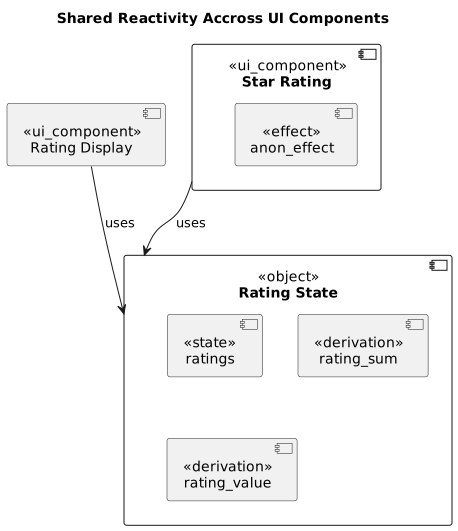
Component Composition
Component Composition

Nesting
Builds a component hierarchy by nesting Svelte components within each other.

Snippets
Defines a shareable and reusable fragment of Markup without the Overhead of a component file.
Snippets, and render tags, are a way to create reusable chunks of markup inside your components. [...] Like function declarations, snippets can have an arbitrary number of parameters [...].
Asynchronous Data
Render
Fetch Data
Update DOM
Asynchronous Data
Render
Fetch Data
Update DOM

Asynchronous Data
Await Expressions
Other Userful Features
Context API
A way to share values across distant components without passing them through every level.
Transitions
A way to animate elements when they appear or disappear.
A way to handle user interactions by passing callback functions to elements and components.
Event Listeners
A way to add behavior to DOM elements when they are created or updated.
Attachments
Other Userful Features
Event Listeners
<script>
  import Info from "./Info.svelte";

  let open = $state(true);

  function onNote() {
    open = false;
    alert("Noted!");
  }
</script>

<Info
  info="Things happened, please take note."
  {open} {onNote}
/>Event Listeners
<script>
  import Info from "./Info.svelte";

  let open = $state(true);

  function onNote() {
    open = false;
    alert("Noted!");
  }
</script>

<Info
  info="Things happened, please take note."
  {open} {onNote}
/>
<script>
let { info, onNote, ...rest } = $props();
</script>
<dialog {...rest}>
<article>
{info}
<footer class="grid">
<button
type="button"
onclick={onNote}>Ok</button>
</footer>
</article>
</dialog>Transitions
Transitions
<script>
  import { fade, slide } from "svelte/transition";

  let visible = $state(false);
</script>

<button onclick={() => (visible = !visible)}>
  {visible ? "Hide" : "Show"} Box
</button>

{#if visible}
  <div class="box" transition:fade={{ duration: 200 }}>
    Hello, I'm transitioning!
  </div>
{/if}Attachments
Attachments
<script>
  import tippy from 'tippy.js';
</script>

<button
  {@attach (element) => tippy(
    element,
    {content: "Tooltip attached"}
  )}>
  Tooltipped Button
</button>